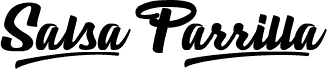
Fountained by Ditatype is a free brush font with flowing italic strokes and a bold script shape that feels hand painted rather than drawn with a rigid pen. The letters connect in a loose, lively rhythm, with rounded curves and sharp swashes that give the name a strong handwritten presence.
Fountained is a free font that works well for logo marks, product packaging, poster titles, social media graphics, and short quote designs where a brushed signature style helps the text feel personal. It also fits invitation accents, cafe branding, and album art, especially when you want an expressive script that can carry a headline without looking overly formal.
--
Please read this carefully before installing the font.
By downloading this font, you are considered to understand and agree to all the terms and conditions below.
This font is for PERSONAL USE ONLY and NO COMMERCIAL USE ALLOWED. For group use, the font may only be used for religious events and social activities that do not generate profit.
DILARANG KERAS to use or exploit this font for commercial purposes, including but not limited to:
- advertising
- promotion
- TV
- film
- video
- motion graphics
- YouTube
- product packaging (physical or digital)
- any media intended to generate profit
Any misuse of the license will incur the Company License fee (National/Wordwide Corporate License) and may be subject to worldwide corporate fees. Misuse may also be pursued through legal channels under Undang-Undang Nomor 28 Tahun 2014 Tentang Hak Cipta.
All content and intellectual property of Din Studio are protected by the State. Any violation pursued through legal channels will be handled by the legal team of Perkumpulan Desainer Huruf Indonesia (PDHI).
Please read the document included in the downloaded folder before installing the font.
If you make money with this font, purchase a license here:
https://ditatype.com/product/fountained-bold-script-font/
For more information or questions, contact:
donis4design@gmail.com
Din Studio website:
https://din-studio.com/
Font installation tutorial for Mac and Windows:
https://din-studio.com/how-to-access-the-special-character-in-your-desktop-mac-and-windows/